A minimal terminal email client for people who write in Markdown and live in Neovim.
Neomd is my way of implementing an email TUI based on my experience with Neomutt, focusing on Neovim (input) and reading/writing in Markdown and navigating with Vim Motions with the GTD workflow and HEY-Screener.
The key here is speed in which you can navigate, read, and process your email. Everything is just a shortcut away, and instantly (ms not seconds). It's similar to the foundations that Superhuman was built on: it runs on Gmail and makes it fast with vim commands.
With the HEY-Screener, you get only emails in your inbox that you screened in, no spam or sales pitch before you added them. Or don't like them, just screen them out, and they get automatically moved to the "ScreenedOut" folder.
With the GTD approach, using folders such as next (inbox), waiting, someday, scheduled, or archive, you can move them with one shortcut. This allows you quickly to move emails you need to wait for, or deal with later, in the right category. Processing your email only once.
With the additional Feed and Papertrail, two additional features from HEY, you can read newsletters (just hit F) on them automatically in their separate tab, or move all your receipts into the Papertrail. Once you mark them as feed or papertrail, they will moved there automatically going forward. So you decide whether to read emails or news by jumping to different tabs.
Note on Speed: Startup: fetches headers via IMAP (fetchFolderCmd) — this takes a network round-trip (maybe 0.5-2s depending on server/connection), after that everything is in-memory and the navigation is instant. Applying IMAP calls such as switching folders and opening emails are typically around 100-500ms on a good connection.
YouTube rundown of most features:
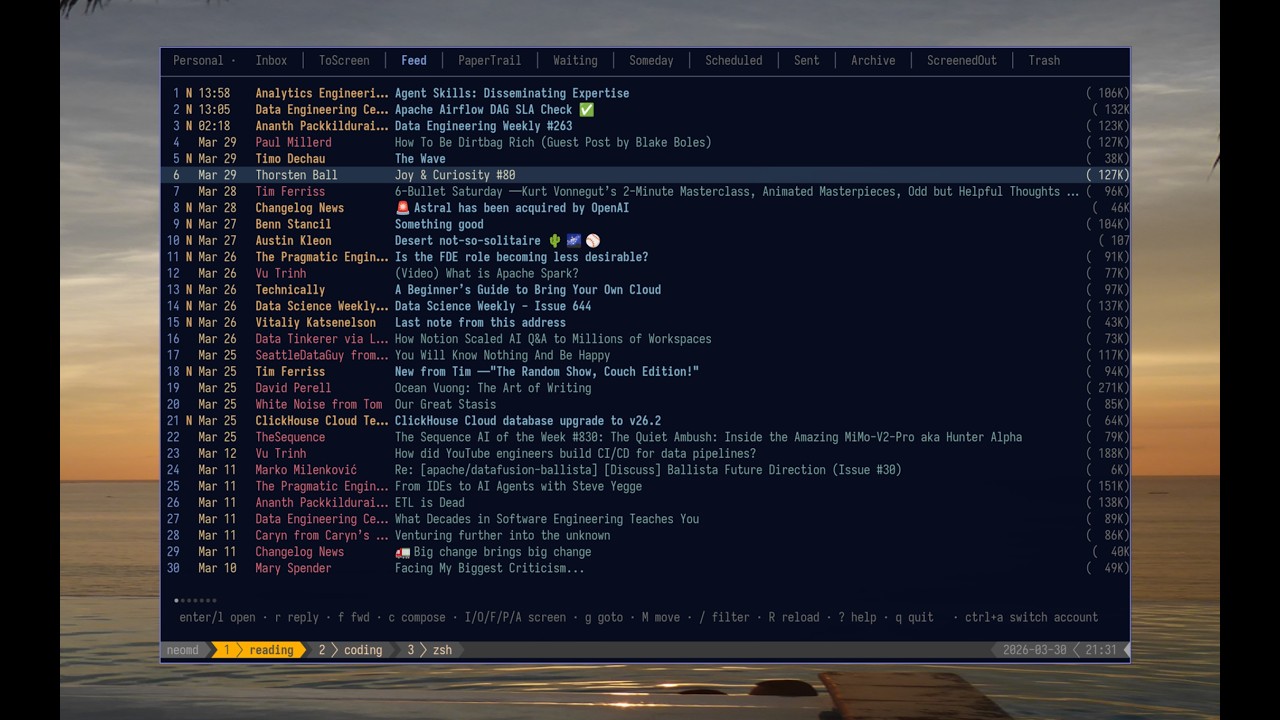
Feed view with all Newsletters - also workflow with differnt tabs and unread counter only for certain tabs (not all):

Reading an email with Markdown 💙:


Or in Gmail:

This is the markdown sent:
# [neomd: to: email@domain.com]
# [neomd: subject: this is an email from neomd!]

This email is from Neomd. Great I can add links such as [this](https://ssp.sh) with plain Markdown.

E.g. **bold** or _italic_.

## Does headers work too?

this is a text before a h3.

### H3 header

how does that look in an email?
Best regards
Compose emails in your editor, read them rendered with glamour, and manage your inbox with a HEY-style screener — all from the terminal.
- Write in Markdown, send beautifully — compose in
$EDITOR(defaults tonvim), send asmultipart/alternative: raw Markdown as plain text + goldmark-rendered HTML so recipients get clickable links, bold, headers, inline code, and code blocks - Pre-send review — after closing the editor, review To/Subject/body before sending; attach files, save to Drafts, or re-open the editor — no accidental sends
- Attachments — attach files from the pre-send screen via yazi (
a); images appear inline in the email body, other files as attachments; also attach from within neovim via<leader>a; the reader lists all attachments (including inline images) and1–9downloads and opens them - Link opener — links in emails are numbered
[1]-[0]in the reader header; pressspace+digitto open in$BROWSER - CC, BCC, Reply-all — optional Cc/Bcc fields (toggle with
ctrl+b);Rin the reader replies to sender + all CC recipients - Drafts —
din pre-send saves to Drafts (IMAP APPEND);Ein the reader re-opens a draft as an editable compose - Multiple From addresses — define SMTP-only
[[senders]]aliases (e.g.s@ssp.shthrough an existing account); cycle withctrl+fin compose and pre-send; sent copies always land in the Sent folder - Undo —
ureverses the last move or delete (x,A,M*) using the UIDPLUS destination UID - Search —
/filters loaded emails in-memory;space /or:searchruns IMAP SEARCH across all folders (only fetching header capped at 100 per folder) with results in a temporary "Search" tab; supportsfrom:,subject:,to:prefixes - Address autocomplete — To/Cc/Bcc fields autocomplete from screener lists; navigate with
ctrl+n/ctrl+p, accept withtab - Everything view —
geor:everythingshows the 50 most recent emails across all folders; find emails that were screened out, moved to spam, or otherwise hard to locate - Threaded inbox — related emails are grouped together in the inbox list with a vertical connector line (
│/╰), Twitter-style; threads are detected viaIn-Reply-To/Message-IDheaders with a subject+participant fallback; newest reply on top, root at bottom - Glamour reading — incoming emails rendered as styled Markdown in the terminal
- HEY-style screener — unknown senders land in
ToScreen; pressI/O/F/Pto approve, block, mark as Feed, or mark as PaperTrail; reuses your existingscreened_in.txtlists from neomutt - Folder tabs — Inbox, ToScreen, Feed, PaperTrail, Archive, Waiting, Someday, Scheduled, Sent, Trash, ScreenedOut
- Multi-select —
mmarks emails, then batch-delete, move, or screen them all at once - Auto-screen on load — screener runs automatically every time the Inbox loads (startup,
R); keeps your inbox clean without pressingS(configurable, on by default) - Background sync — while neomd is open, inbox is fetched and screened every 5 minutes in the background; interval configurable, set to
0to disable - Kanagawa theme — colors from the kanagawa.nvim palette
- IMAP + SMTP — direct connection via RFC 6851 MOVE, no local sync daemon required and keeps it in sync if you use it on mobile or different device
Prerequisites: Go 1.22+ and make.
git clone https://github.com/ssp-data/neomd
cd neomd
make install   # installs to ~/.local/bin/neomd
Or just build locally:
make build
./neomd
Or if on Arch Linux (AUR), you can use my neomd-bin via:
yay -S neomd-binOn first run, neomd:
- Creates
~/.config/neomd/config.tomlwith placeholders — fill in your IMAP/SMTP credentials - Creates
~/.config/neomd/lists/for screener allowlists (or uses your custom paths from config) - Creates any missing IMAP folders (ToScreen, Feed, PaperTrail, etc.) automatically
Neomd also runs on Android (more for fun) — see docs/android.md.
On first run, neomd creates ~/.config/neomd/config.toml with placeholders:
[[accounts]]
name     = "Personal"
imap     = "imap.example.com:993"   # :993 = TLS, :143 = STARTTLS
smtp     = "smtp.example.com:587"
user     = "me@example.com"
password = "app-password"
from     = "Me <me@example.com>"

[screener]
screened_in  = "~/.config/neomd/lists/screened_in.txt"
screened_out = "~/.config/neomd/lists/screened_out.txt"
feed         = "~/.config/neomd/lists/feed.txt"
papertrail   = "~/.config/neomd/lists/papertrail.txt"
spam         = "~/.config/neomd/lists/spam.txt"
Use an app-specific password (Gmail, Fastmail, Hostpoint, etc.) rather than your main account password.
For the full configuration reference including multiple accounts, [[senders]] aliases, folder customization, signatures, and UI options, see docs/configuration.md.
Press ? inside neomd to open the interactive help overlay. Start typing to filter shortcuts.
See the full keybindings reference (auto-generated from internal/ui/keys.go via make docs).
Unknown senders land in ToScreen; press I/O/F/P to approve, block, or classify them. Auto-screening keeps your inbox clean without manual intervention.
See docs/screener.md for the full workflow, classification tables, and bulk re-classification instructions.
Compose in Markdown, send as multipart/alternative (plain text + HTML). Attachments, CC/BCC, multiple From addresses, drafts, and pre-send review are all supported.
- See docs/sending.md for details on MIME structure, attachments, pre-send review, and drafts.
- See docs/reading.md for the reader: images, inline links, attachments, and navigation.
make build    compile ./neomd
make run      build and run
make install  install to ~/.local/bin
make test     run tests
make vet      go vet
make fmt      gofmt -w .
make tidy     go mod tidy
make clean    remove compiled binary
make help     print this list
- Bubble Tea — TUI framework
- Bubbles — list, viewport, textinput components
- Glamour — Markdown → terminal rendering
- Lipgloss — styling
- go-imap/v2 — IMAP client (RFC 6851 MOVE)
- go-message — MIME parsing
- goldmark — Markdown → HTML for sending
- BurntSushi/toml — config parsing
See CHANGELOG.md for what's new.
See SECURITY.md for how credentials, screener lists, temp files, and network connections are handled — with links to the relevant source files.
- Neomutt — the gold standard terminal email client; neomd reuses its screener list format and borrows keybindings (though most are custom made and what I use)
- HEY — the Screener concept: unknown senders wait for a decision before reaching your inbox
- hey-cli — a Go CLI for HEY; provided the bubbletea patterns used here
- newsboat — RSS reader whose
Oopen-in-browser binding and vim navigation feel inspired neomd's reader view - emailmd.dev — the idea that email should be written in Markdown when seen on HN
- charmbracelet/pop — minimal Go email sender from Charm
- charmbracelet/glamour — Markdown rendering in the terminal
- kanagawa.nvim — the color palette used for the inbox
- msgvault — Go IMAP archiver; the IMAP client code in neomd is adapted from it
This TUI is mostly vibe-coded in the sense that all code is written with Claude Code, but guided by very detailed instructions to make the workflow as I use it and like it to be.
I used my experience with Neomutt, TUIs, and the GTD workflow for handling emails with HEY Screener, and added some (hopefully) taste using my favorite tools and aesthetics. Find the full history at Twitter - inspired by seeing Email.md on HackerNews.
If you rather read the prompt, check out my initial prompt and its generated plan - which I have iterated and added features by the 100s since then.
See at my second brain at Roadmap.