



From the lab to enterprise grade orchestration — instantly.
The open source, GDPR compliant, security audited successor to the OpenAI Assistants API. Same primitives. Every model. Your infrastructure.

Project David is a full-scale, containerized LLM orchestration platform built around the same primitives as the OpenAI Assistants API — Assistants, Threads, Messages, Runs, and Tools — but without the lock-in.
- Provider agnostic — Hyperbolic, TogetherAI, Ollama, or any OpenAI-compatible endpoint
- Every model — hosted APIs today, raw local weights tomorrow via Project Uni5
- Your infrastructure — fully self-hostable, GDPR compliant, security audited
- Production grade — sandboxed code execution (FireJail PTY), multi-agent delegation, file serving with signed URLs, real-time streaming frontend
| OpenAI Assistants API | LangChain | Project David | |
|---|---|---|---|
| Assistants / Threads / Runs primitives | ✅ | ❌ | ✅ |
| Provider agnostic | ❌ | Partial | ✅ |
| Local model support | ❌ | Partial | ✅ |
| Raw weights → orchestration | ❌ | ❌ | ✅ (Uni5) |
| Sandboxed code execution | ✅ Black box | ❌ | ✅ FireJail PTY |
| Multi-agent delegation | Limited | ❌ | ✅ |
| Self-hostable | ❌ | ✅ | ✅ |
| GDPR compliant | ❌ | N/A | ✅ |
| Security audited | N/A | N/A | ✅ |
| Open source | ❌ | ✅ | ✅ |
1. Install the local package.
pip install -e .2. Build and start the Docker stack.
platform-api docker-manager --mode both📦 What gets generated on first run
File What it contains .envUnique locally-generated secrets — DB passwords, DEFAULT_SECRET_KEY,SEARXNG_SECRET_KEYetc. Never committed to version control.docker-compose.ymlA fully-wired Compose file referencing those secrets. Both files are created once and left untouched on subsequent runs.
Verify the CLI:
platform-api --helpUsage: platform-api [OPTIONS] COMMAND [ARGS]...
Entities API management CLI.
╭─ Commands ───────────────────────────────────────────────────────────────────────────────────────────────────────────────────────────────────────────────────────────────────────╮
│ configure Update variables in an existing .env without regenerating secrets. │
│ bootstrap-admin Provision the default admin user inside the running api container. │
╰──────────────────────────────────────────────────────────────────────────────────────────────────────────────────────────────────────────────────────────────────────────────────╯
For the full command reference see Docker orchestration commands →
3. Provision your admin credentials.
Set SPECIAL_DB_URL before running:
# Linux / macOS
export SPECIAL_DB_URL=mysql+pymysql://user:password@localhost:3307/entities_db
# Windows PowerShell
Get-Content .env | ForEach-Object {
if ($_ -match '^\s*([^#][^=]+)=(.*)$') {
[System.Environment]::SetEnvironmentVariable($matches[1].Trim(), $matches[2].Trim())
}
}Then run:
platform-api bootstrap-admin bootstrap-adminOr explicitly:
platform-api bootstrap-admin \
  --db-url "mysql+pymysql://user:password@localhost:3307/entities_db" \
  --email "admin@example.com" \
  --name "Default Admin"
Expected output:
================================================================
  ✓  Admin API Key Generated
================================================================
  Email   : admin@example.com
  User ID : user_abc123...
  Prefix  : ad_abc12
----------------------------------------------------------------
  API KEY : ad_xxxxxxxxxxxxxxxxxxxxxxxxxxxxxxxxxxxxxxxxxxxxxxxx
----------------------------------------------------------------
  This key will NOT be shown again.
================================================================
⚠️ Store this key immediately. It is shown exactly once and cannot be recovered.
4. Provision your first user.
pip install projectdavidimport os
from dotenv import load_dotenv
from projectdavid import Entity
load_dotenv()
client = Entity(api_key=os.getenv("ADMIN_API_KEY"))
new_user = client.users.create_user(
full_name="Kevin Flynn",
email="flynn@encom.com",
is_admin=False,
)
print(new_user)Issue the user an API key:
api_key = client.keys.create_key_for_user(
    target_user_id=new_user.id,
    key_name="The Grid"
)
print(api_key.plain_key)
# ea_z_5YV4zGly50UHKlenc9BgTCQXtE....
⚠️ Do not use the admin key for general API calls.
The user is now ready to connect via the SDK:
client = Entity(api_key=os.getenv("USER_API_KEY"))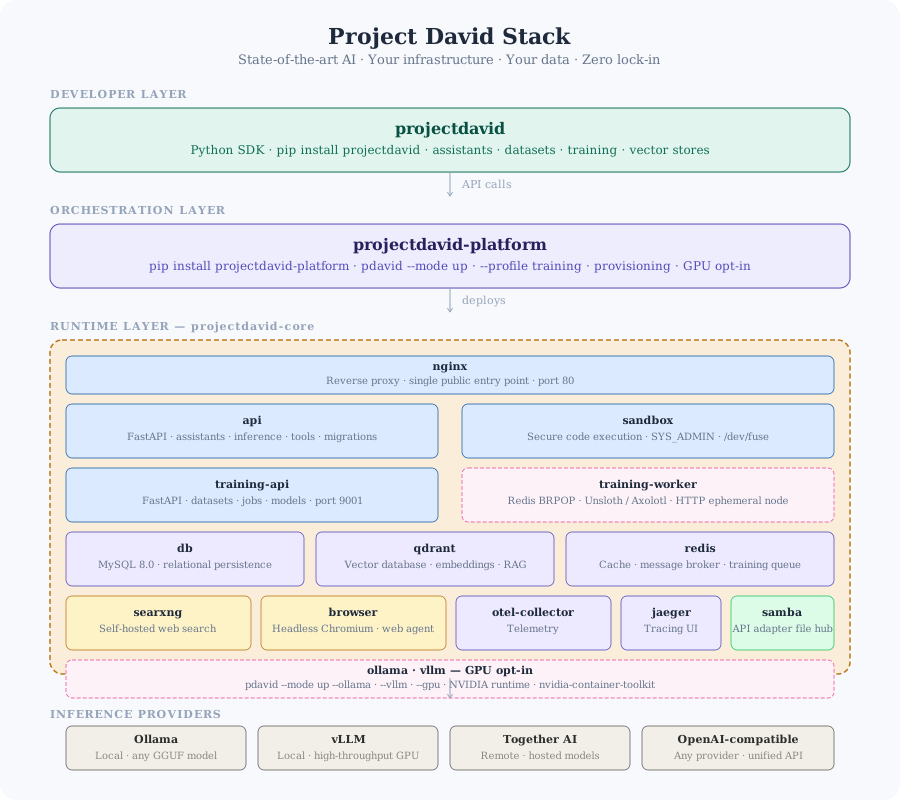
| Topic | Link |
|---|---|
| Full Documentation | docs.projectdavid.co.uk |
| SDK Quick Start | docs.projectdavid.co.uk/docs/sdk-quick-start |
| Docker Commands | docs.projectdavid.co.uk/docs/docker_commands |
| Providers | docs.projectdavid.co.uk/docs/providers |
Full hosted docs: docs.projectdavid.co.uk
| Repo | Description |
|---|---|
| projectdavid | Python SDK |
| entities-common | Shared utilities and validation |
| david-core | Docker orchestration layer |
| reference-frontend | Reference streaming frontend |
| entities_cook_book | Minimal tested examples |
Distributed under the PolyForm Noncommercial License 1.0.0. Commercial licensing available upon request.